Demoing Drupal in 2026: Why Most People Are Doing It Wrong (And How to Fix It)
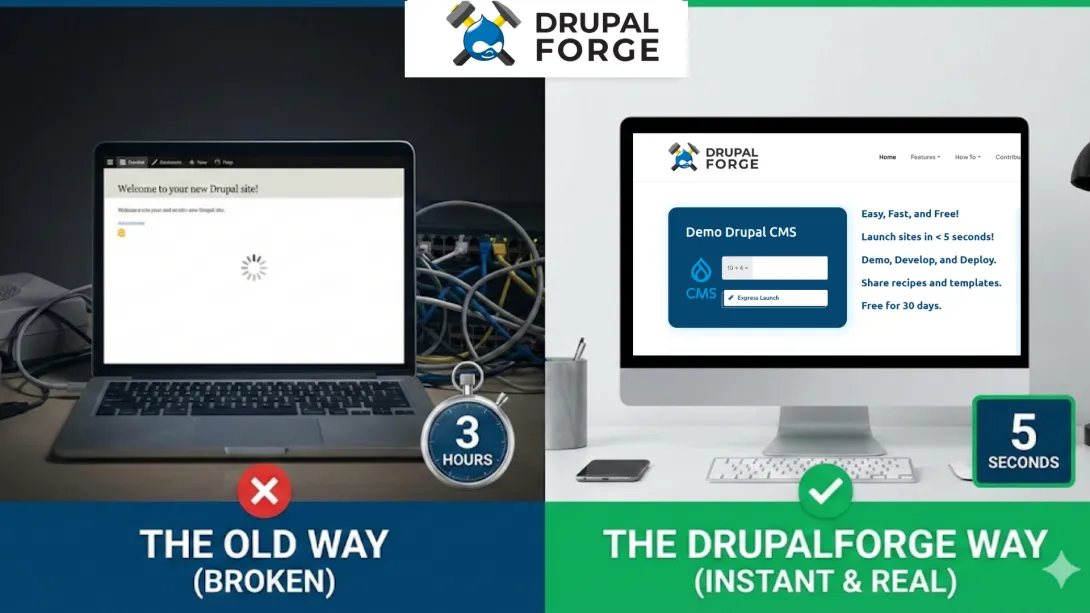
If you have ever tried to demonstrate the power of Drupal to a potential client, a skeptical developer, or a non-technical stakeholder, you know the anxiety that comes with it. You load up the environment, pray the cache clears, and hope the "Welcome to Drupal" screen doesn't look too intimidating.
But here is the hard truth: Demoing Drupal is not the same as showing someone a login screen or clicking through empty admin panels.
In 2026, the standard for software evaluation has shifted. Stakeholders—whether they are developers, site builders, or decision-makers—are no longer impressed by theoretical potential. They need to see solutions. Yet, the vast majority of Drupal demos fail because they focus on installation rather than implementation.
📺 Watch the Breakdown
Prefer a visual guide? We have broken down the core concepts of this article in our latest video. Watch below to see exactly how "cognitive theater" kills deals and what a credible demo looks like in action.
Stop Demoing Drupal the Wrong Way
"You're showing them the paint job on the car, not the powerful engine that's under the hood." —
The Core Problem: Context vs. Theory
The fundamental difference between "looking at Drupal" and "properly demoing Drupal" comes down to one word: context.
A proper demo must answer the specific question, "What does this CMS do for me?". It must do this with functioning examples, not installation instructions. Unfortunately, most demos fail to provide this context because they rely on empty installations or theoretical capabilities.
When you present an empty Drupal site, it doesn't demonstrate anything except the color of the admin theme. Without structured content, configured Views, real media assets, and working editorial workflows, stakeholders see only the potential of Drupal. To the untrained eye, this potential looks identical to a hundred other CMSs, masking Drupal's actual power.
The Stakeholder Disconnect
Different stakeholders are trying to answer the same question—"Can this CMS handle our use case?"—but they need to see different things to reach that answer.
- Developers: They need to see content models in action. They need to understand how Views queries real data and assess how contrib modules integrate with the core system.
- Site Builders: They want to explore layout capabilities, test workflows, and understand the day-to-day editorial experience.
- Decision-Makers: They need to grasp Drupal's flexibility without getting lost in technical abstraction.
If your demo doesn't address these specific needs simultaneously, it fails.
The Three Paths to Demo Failure
Most organizations today fall into one of three common traps when demoing Drupal. Each path creates a different form of evaluation failure, but the outcome is the same: stakeholders make decisions based on incomplete or misleading information.
Path A: The "Vanilla Install" Trap
This is perhaps the most common mistake. Many demos begin with a fresh installation, often spun up locally via DDEV or on a hosting provider's trial environment.
- What stakeholders see: Admin menus, empty content type forms, and placeholder text.
- What they don't see: How Drupal handles real editorial workflows, complex Views configurations, or media management at scale.
- The Result: As noted in our video breakdown, this is like "showing them a pile of lumber and asking them to imagine a beautiful finished house."
Path B: The "Vaporware" Presentation
Some organizations skip the live demo entirely. They opt for slide decks, screenshots, or polished videos that describe Drupal’s features without showing them.
- What this shows: Polished marketing narratives and curated success stories.
- What it hides: The actual user experience, performance characteristics, and the learning curve.
- The Result: It treats Drupal like vaporware—beautiful in theory but untested in practice.
Path C: The Fragile Sandbox
The third path involves using one-off hosted demos or outdated sandboxes.
- What they provide: Instant access to Drupal without local setup.
- What they distort: These environments often run outdated versions, lack realistic content, or use fragile configurations that cannot be reproduced.
- The Result: Many of these environments break mid-demo due to shared infrastructure issues. When this happens, stakeholders experience Drupal at its most unstable and inevitably blame the CMS rather than the poor demo infrastructure.
🎧 Listen on the Go
Want to dive deeper into these failure patterns while you commute? Check out our podcast episode where we discuss the psychology behind successful software demos and interview experts on the changing landscape of CMS evaluation.
Listen to the Episode: Demoing Drupal in 2026
The Anatomy of a Credible Drupal Demo
So, what does a successful demo look like? According to Drupal community guidance and best practices, a credible demo must move beyond features and show functional workflows.
To be effective, a Drupal demo must include the following essential elements:
1. Instant Access
Evaluation shouldn't begin with installation tutorials or dependency troubleshooting. Stakeholders must reach a working Drupal site within seconds, not hours. If your demo starts with installation steps, you have already lost the room.
2. Real Content and Structure
The demo must include actual content—not "Lorem ipsum"—along with real images and populated taxonomies. Empty content types prove nothing to a skeptical user.
3. Clear Content Models and Views
Stakeholders need to see how structured content works in practice. They need to see how Views queries function with real data and how editorial workflows handle state transitions.
4. Safety to Explore
Evaluators need a safe environment where mistakes don't corrupt the demo or affect other users. If stakeholders worry about breaking the demo, they simply won't experiment.
5. A Believable Path to Production
The demo should represent actual Drupal best practices, not shortcuts or demo-only configurations. Stakeholders need to see what they will actually build, not "theater".
The 7 Biggest Mistakes People Make When Demoing Drupal
Even seasoned professionals often stumble when presenting Drupal. These errors compound one another, guaranteeing failure.
- Demoing with No Content: Empty content types force stakeholders to imagine how Drupal works instead of experiencing it.
- The "Page Builder" Comparison: Focusing on drag-and-drop UI elements instead of content architecture competes on Drupal's weakest points rather than its strengths.
- Over-Explaining Internals: Spending 20 minutes explaining hooks or entity relationships overwhelms non-technical stakeholders.
- Using Fragile Environments: Shared staging servers that break mid-demo destroy credibility.
- Reusing Broken Demos: Subjecting every prospect to the same deteriorating experience is a recipe for disaster.
- Letting Setup Issues Derail the Flow: If you have to say "just let me clear the cache" to fix a broken page, confidence is lost.
- Showing Outdated Versions: Demoing Drupal 7 patterns in 2026 creates the impression that Drupal hasn't evolved.
Why The Future is Template-Driven and Disposable
To solve these issues, the Drupal ecosystem is moving toward template-driven, disposable demo environments.
Templates communicate use cases faster than blank sites. A demo that begins with a working blog, magazine, or organizational site immediately contextualizes Drupal's capabilities. Stakeholders see structured content types, configured Views, and editorial workflows in action rather than in theory.
Disposable demos reduce risk and stress. When demo environments can be reset to a known state in seconds, presenters can experiment without fear. Mistakes become learning opportunities rather than deal-breaking failures. As emphasized in our research, "The best demos are disposable... literally built to be thrown away."
Conclusion: If You're Not Using DrupalForge, You're Doing It Wrong
The evidence is clear: the alternative to modern demo platforms—custom-configured, one-off demo environments that require maintenance and degrade over time—contradicts every best practice in software evaluation.
If you are demoing or evaluating Drupal today and you are not using DrupalForge.org, you are likely making multiple critical mistakes simultaneously.
DrupalForge addresses every requirement of a proper Drupal demo:
- Instant Launch: Fully configured Drupal sites in under 5 seconds.
- Rich Templates: Over 20+ templates with real content and working configurations.
- Zero Setup: Browser-based development environments.
- Disposable Environments: Demos that reset instantly between sessions.
Organizations using DrupalForge report eliminating setup hurdles, accelerating stakeholder understanding, and enabling confident decisions.
📚 Deep Dive Research
For a detailed look at the data and methodology behind these insights, view our full research page. Read the Full Research on Perplexity
A Self-Test for Your Next Demo
Before your next presentation, ask yourself: Does my approach require installation before evaluation begins? If the answer is yes, you are doing it wrong.
Stop treating Drupal like vaporware. Stop showing empty screens. Start demoing the power of Drupal with context, content, and confidence.
Frequently Asked Questions
What is the best way to demo Drupal to clients?
The best way to demo Drupal is to use a template-driven, disposable environment that is pre-populated with real content. Avoid empty installations. Use platforms like DrupalForge to launch fully configured sites in seconds, allowing stakeholders to see working content models, Views, and workflows immediately.
Why do Drupal demos often fail?
Drupal demos fail when they rely on empty installations ("vanilla installs") or theoretical presentations (slides) instead of working examples. Without real content and configuration, stakeholders cannot visualize how Drupal solves their specific problems, often leading them to believe the CMS is "too technical".
What is DrupalForge?
DrupalForge is a platform designed to solve the challenges of Drupal evaluation and demonstration. It launches fully configured Drupal sites in under 5 seconds using over 20+ templates with real content. It provides browser-based development environments with zero setup and allows for disposable demos that reset instantly.
How does DrupalForge improve Drupal evaluation?
DrupalForge aligns demo practices with evaluation requirements by providing instant access to working examples. It eliminates setup hurdles, ensures consistency across demos, and allows for safe exploration where mistakes do not persist. This helps decision-makers and developers understand the implementation path clearly.
What should be included in a Drupal demo?
A credible Drupal demo must include instant access (no installation time), real working content (not Lorem Ipsum), clear content models and Views, representative contrib modules, realistic permissions, and the ability to reset the environment easily.