The Drupal AI Lab: Test Drupal AI Without Installing Anything
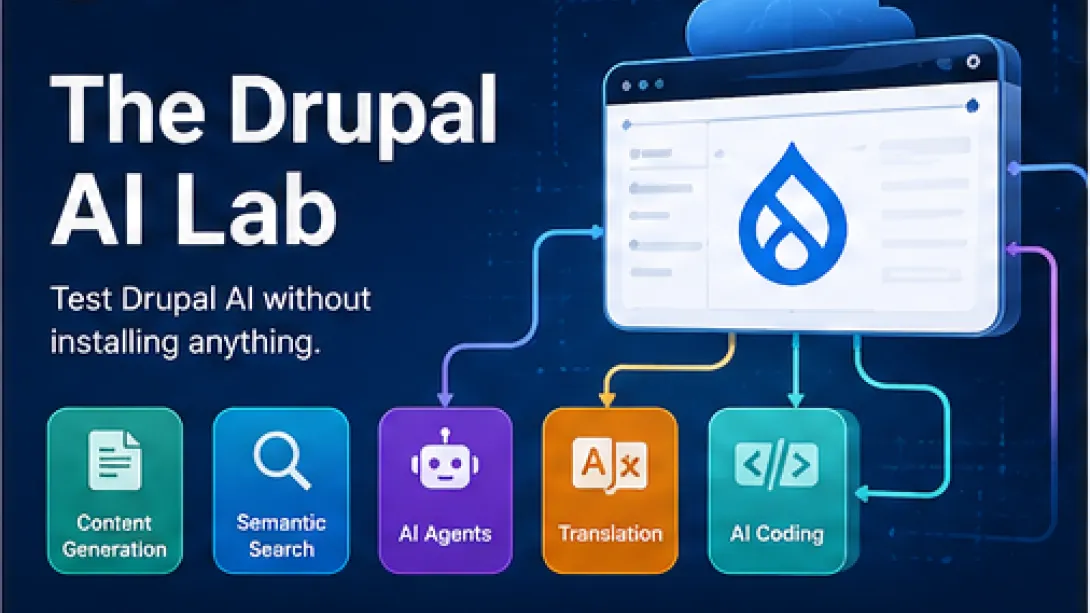
Drupal AI is moving beyond simple text generation.
Today, teams can use AI inside Drupal to assist with site building, structured content, translation, semantic search, accessibility, content governance, development, and agent-based workflows.
But trying these capabilities often comes with a familiar obstacle: setup.
Before you can test the feature you came to see, you may need to install Drupal, configure Composer packages, select an AI provider, add API credentials, prepare sample content, and troubleshoot the environment.
DrupalForge gives you a faster path.
Instead of assembling everything locally, you can launch a preconfigured Drupal AI environment in the cloud and begin exploring it from your browser.
No local Docker installation. No disposable laptop configuration. No need to modify an existing client project.
Think of it as a Drupal AI lab: a safe place to explore, learn, demonstrate, break things, rebuild them, and decide which AI capabilities are worth taking into a real implementation.
Explore Drupal AI templates on DrupalForge:
Drupal AI Is Becoming a Platform, Not Just a Feature
The Drupal AI project provides a shared framework for connecting Drupal with different AI providers and models.
That foundation allows contributed modules and Drupal CMS features to use AI without every module creating its own separate integration.
Learn more about the Drupal AI project:
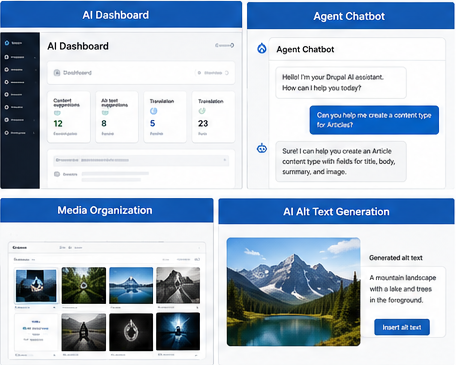
Drupal CMS 2.0 has brought several of these capabilities closer to everyday marketers, site builders, and content teams. Current features include an AI dashboard, an administrative chatbot, image alt-text assistance, media organization tools, and provider integrations.
Read about AI in Drupal CMS 2.0:
The broader Drupal AI Initiative is also coordinating work across AI foundations, products, marketing, user experience, governance, and responsible implementation.
Learn about the Drupal AI Initiative:
This means the question is no longer simply, “Can Drupal connect to an AI model?”
The more important questions are:
• Can AI work with Drupal’s structured content?
• Can it follow an organization’s permissions and workflows?
• Can an agent take approved actions inside Drupal?
• Can AI-generated changes be reviewed by people?
• Can organizations change providers without rebuilding everything?
• Can teams test these ideas before using them on a production website?
DrupalForge is designed to help answer those questions through working environments rather than presentations alone.
Why Drupal AI Can Be Difficult to Evaluate
A useful Drupal AI demonstration may depend on several connected technologies:
• A Drupal or Drupal CMS installation
• The Drupal AI module and supporting modules
• An AI provider such as OpenAI, Anthropic, Gemini, or a private model
• Provider credentials and spending controls
• Configured content types and fields
• Search API and vector storage for semantic search
• AI agents, tools, assistants, or automators
• Sample content that makes the demonstration meaningful
Developers can configure these components, but that does not mean every evaluator should have to do so before seeing the result.
• A content editor may only want to know whether AI-assisted rewriting fits the editorial workflow.
• An agency may need a working agent demonstration for an upcoming client meeting.
• A university may want to test semantic search against institutional content.
• A developer may want to examine an experimental module without introducing it into an active local project.
DrupalForge removes much of that initial friction by providing preconfigured templates that run in isolated cloud environments.
Browse DrupalForge templates:
Start With the Drupal CMS AI Template
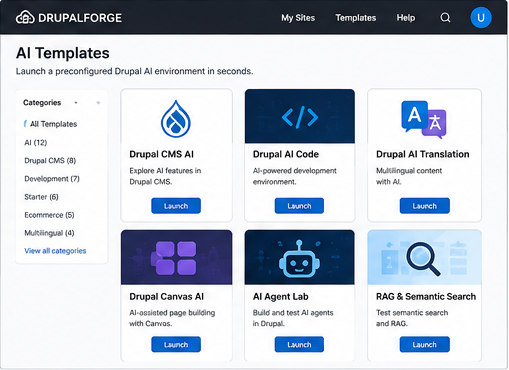
For a general introduction, begin with the Drupal CMS AI template.
Launch the Drupal CMS AI template:
DrupalForge provisions the site for you and can provide access to both the Drupal administrative interface and a cloud development environment.
Depending on the selected template, you may receive:
• A working Drupal CMS installation
• Preinstalled AI modules
• Configured demonstrations
• Sample content
• A browser-based VS Code environment
• A terminal with Composer and Drush
• Database management access
• Limited trial access to an AI provider or the option to add your own key
You can approach the same environment from several perspectives. A marketer can test the editing experience. A site builder can inspect fields, recipes, permissions, and workflows. A developer can open the codebase and examine how the modules are assembled.
What You Can Test in the Drupal AI Lab
AI-Assisted Content Editing
AI can assist editors without forcing them to move content into a separate application.
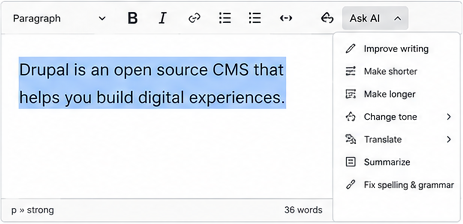
Inside an AI-enabled Drupal editing experience, teams can experiment with actions such as:
• Rewriting a paragraph
• Changing tone
• Shortening or expanding content
• Creating summaries
• Improving readability
• Generating alternative versions
• Translating content
The editor remains inside Drupal, working with the content type, field structure, permissions, revisions, and publishing workflow already associated with the page.
To explore a focused multilingual example, launch the Drupal AI Translation template:
Structured Content With AI Automators
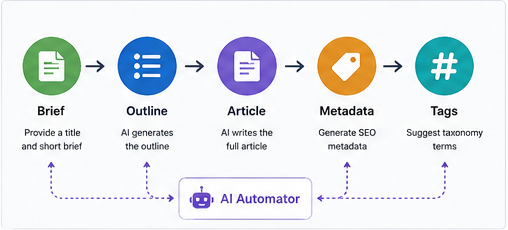
Generating a page of text is easy. Turning AI output into structured, reusable Drupal data is much more useful.
AI Automators can connect prompts and model responses to Drupal fields.
For example, entering a title and short brief could trigger the creation of:
• A page outline
• A full article
• A summary
• SEO metadata
• Suggested taxonomy terms
• A social media excerpt
• An image-generation prompt
Automators can also be chained so that one generated field becomes the input for another step. This is especially valuable for teams that need consistent output across large quantities of structured content.
For more examples, read: Master Drupal AI With Free DrupalForge Templates
Semantic Search and RAG
Traditional search frequently depends on exact words. Semantic search focuses more on meaning and intent.
A visitor may describe what they need without using the same language contained in the relevant page. Embeddings and vector search can help connect the request with conceptually related content.
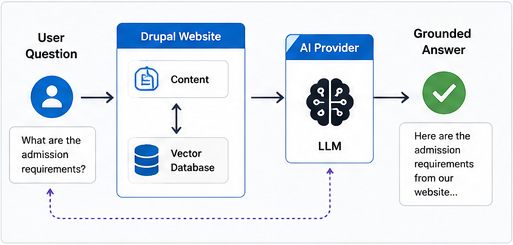
Retrieval-Augmented Generation (RAG) goes further. It allows a model to retrieve information from an approved knowledge base before generating a response.
In Drupal, that knowledge base could include:
• Documentation and policies
• University program information
• Government services • Product documentation
• Research publications
• Support articles
• Module and project data
A RAG demonstration allows teams to explore how a Drupal site can answer questions using its own content rather than relying only on the general knowledge of a model.
AI Agents That Can Take Approved Actions
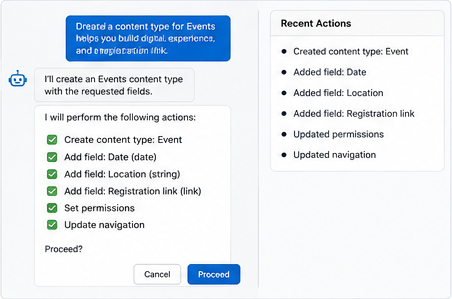
A chatbot returns an answer. An agent can be given access to tools that allow it to complete defined tasks.
Inside Drupal, an agent may be configured to:
• Create a content type and add fields
• Create taxonomy terms
• Find or summarize content
• Update approved configuration
• Start a workflow
• Perform a defined administrative task
The important phrase is approved actions.
An effective agent implementation requires deliberate choices about permissions, tool access, human approval, logging, testing, and rollback. The DrupalForge AI template collection includes environments for testing agents, comparing models, and running groups of agent tests without giving an experimental agent access to a live website.
Browse the DrupalForge AI template collection:
Visual Agent Workflows
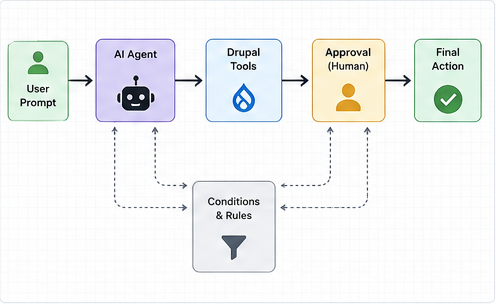
Agent systems become difficult to understand when tools, models, conditions, and approvals are spread across many configuration forms. Visual workflow builders can make those relationships easier to inspect.
DrupalForge includes templates for exploring visual AI workflows. These interfaces can help teams understand:
• Which tools an agent can use
• How one step connects to another
• Where human approval is required
• How different conditions change the path
• How the workflow can be explained to a client or governance team
AI-Generated Image Alt Text
Drupal CMS can use AI to suggest alternative text for uploaded images. This can provide an editor with a useful starting point and reduce repetitive work on media-heavy websites.
The generated result should still be reviewed by someone who understands the purpose and context of the image. AI should assist accessibility work, not remove human responsibility for it.
See the official Drupal CMS AI Assistants overview:
AI-Assisted Drupal Development
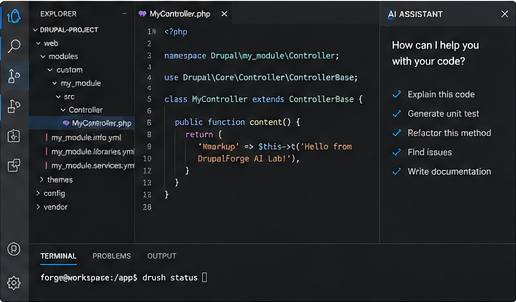
Developers can also experiment with AI inside a real cloud development environment. The Drupal AI Code template combines Drupal CMS with coding assistants such as Claude and Gemini.
Launch the Drupal AI Code template:
Potential experiments include:
• Explaining an unfamiliar codebase
• Generating custom module scaffolding
• Drafting plugins, forms, services, and tests
• Investigating stack traces
• Reviewing deprecated APIs
• Suggesting Drupal coding-standard improvements
• Generating Drush commands
• Creating technical documentation
The cloud environment includes familiar development tools while keeping the experiment separate from your primary machine. AI-generated code should always be reviewed, tested, and understood before it reaches production.
For a deeper debugging workflow, read: AI-Assisted Debugging for Drupal Projects
Drupal Canvas and AI-Assisted Page Building
Drupal Canvas brings visual page building into Drupal, while AI can assist with the creation and refinement of components and page content.
The Drupal Canvas AI template lets you explore this combination in a working Drupal environment.
Launch the Drupal Canvas AI template:
Potential use cases include:
• Generating draft page sections
• Creating content for approved components
• Testing layouts with real content
• Rapidly prototyping landing pages
• Demonstrating page-building workflows to clients
This is particularly useful for agencies that want to move from a static design presentation to an interactive Drupal prototype.
Choose Your Drupal AI Experiment
• Drupal CMS AI • Best for: General Drupal AI exploration
• Drupal AI Code • Best for: AI-assisted development with Claude and Gemini
• Drupal Canvas AI • Best for: AI-assisted visual page building
• Drupal AI Translation • Best for: Multilingual content workflows
• DrupalForge AI Collection • Best for: Agents, RAG, automators, moderation, coding, and more.
A 30-Minute Drupal AI Lab Session
You do not need to evaluate the entire ecosystem in one sitting.
Launch a focused template: Choose the use case closest to your actual need.
Test one editorial or site-building task: Generate, transform, translate, search, or configure something.
Inspect the setup: Look at the modules, providers, fields, prompts, tools, and permissions involved.
Open the cloud development environment: Examine the Composer files, configuration, code, and available commands.
Identify the risks: Consider data access, hallucinations, permissions, spending, review, and logging.
Choose the next experiment: Do not move everything to production at once. Test one valuable workflow more deeply.
At the end of the session, you should be able to ask better questions than, “Does Drupal support AI?” You should be able to ask:
• Which workflow would save our team the most time?
• Which content should the model be allowed to access?
• Which actions require human approval?
• Which provider fits our privacy and cost requirements?
• How will we evaluate the quality of the output?
• What should be logged and reviewed?
• Where could AI introduce operational or reputational risk?
Use AI Keys and Data Carefully
Some templates may include limited trial access to an AI provider. Others may require you to add your own key.
When using your own provider credentials:
• Use the available secret-management process
• Never place keys in page content or commit them to Git
• Apply spending and usage limits
• Remove temporary credentials when testing is complete
• Avoid uploading sensitive production data into a demonstration
• Review the provider’s data-retention and training policies
A convenient lab environment reduces setup time. It does not remove the need for sound security and governance.
From Experiment to a Real Drupal Project
A DrupalForge environment is more useful than a static demonstration because you can continue working with it. After identifying a valuable use case, you can:
• Customize the template
• Add modules and configuration
• Connect a Git repository
• Invite collaborators
• Share the working site with stakeholders
• Use VS Code, Composer, and Drush in the browser
• Export the project to move toward deployment and production hosting
A video shows what another team built. A DrupalForge template gives you something you can inspect, change, test, share, and potentially turn into your own application.
AI Should Be Tested, Not Merely Discussed
The Drupal community is building an increasingly capable open-source AI ecosystem. The real opportunity is not merely connecting a CMS to a model. It is combining AI with Drupal’s structured content, permissions, workflows, revisions, search, governance, and extensibility.
Those capabilities are best understood through direct experimentation.
DrupalForge gives developers, agencies, marketers, educators, and decision-makers a practical place to begin. No local installation. No need to risk an active website. No requirement to understand every component before seeing the first result.
• Browse the Drupal AI Lab: