DrupalForge vs. Local Development (Docker/DDEV): When to Use Which
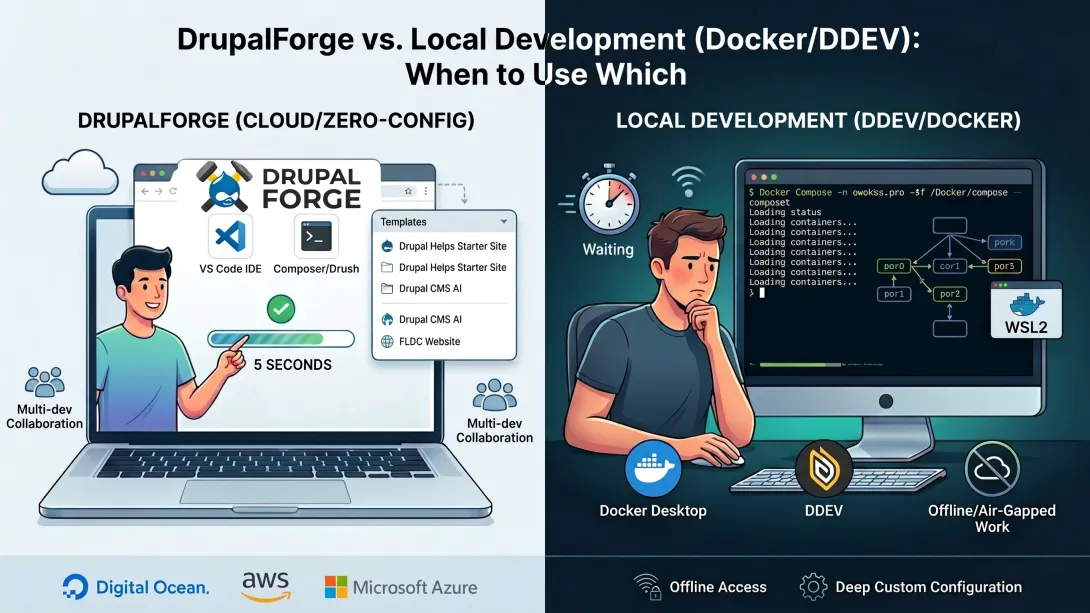
If you've ever stared at a terminal waiting for Docker to spin up a local Drupal environment, you'll appreciate this: research published in 2026 found that Docker Desktop's hypervisor layer introduces a 2.69x startup penalty compared to native Linux, meaning your local setup could be eating minutes you didn't plan to lose. That's exactly the kind of friction that makes the DrupalForge vs. Local Development (Docker/DDEV): When to Use Which question worth asking seriously. Whether you're building, testing, demoing, or teaching Drupal, the right environment can make or break your workflow.
Key Takeaways
| Question | Answer |
|---|---|
| What is DrupalForge? | DrupalForge is a free, cloud-based platform by OPS Association (a Colorado 501(c)(3) nonprofit) that spins up pre-configured Drupal environments in under 5 seconds, with zero local setup required. |
| What is DDEV? | DDEV is a popular open-source local development tool that uses Docker containers to run Drupal (and other CMS) environments on your own machine. |
| Which is better for quick demos? | DrupalForge, hands down. Launch a live Drupal demo in seconds from a browser, no Docker or local config needed. |
| Which is better for long-term local development? | DDEV/Docker is often preferred for offline work and deeply customized environments that need persistent local file access. |
| Is DrupalForge really free? | Yes. Disposable 6-hour sites are completely free. Dev environments are also free (with auto-pause and unlimited extensions). |
| Does DrupalForge work for AI Drupal experiments? | Yes. DrupalForge includes AI-powered Drupal templates like Drupal CMS AI and the Chrome Prompt API demo, all launchable in seconds. |
| Can I learn Drupal with DrupalForge? | Absolutely. DrupalForge was built partly for education, testing, and contribution, making it ideal for anyone trying to learn Drupal without setup friction. |
What Is DrupalForge? (The Zero-Configuration Cloud Option)
Let's start with the basics. DrupalForge is a free platform operated by OPS Association, a Colorado-based nonprofit, that lets you spin up a fully working Drupal environment directly in your browser, no installation required.
You pick a template, submit some basic info, and DrupalForge sends you a link when your site is ready. That's it. We're talking about a live, fully configured Drupal site in under 5 seconds.
Under the hood, DrupalForge runs containers on auto-scaling Kubernetes clusters distributed across Digital Ocean, AWS, and Microsoft Azure. These environments are transient by design and can "move around from cloud to cloud" depending on availability.
The dev environments come pre-loaded with:
A browser-based VS Code IDE (no downloads needed)
Composer and Drush pre-installed
PhpMyAdmin for full MySQL access
The ability to invite other developers for real-time collaboration
Disposable sites run for 6 hours for free, while dev environments can be paused, resumed, and kept alive as long as you like, with no hourly usage cap on free tiers.
What Is Local Development with Docker and DDEV?
DDEV (and local Docker-based workflows generally) takes a different approach. Instead of running your Drupal environment in the cloud, everything runs on your own machine inside Docker containers.
DDEV wraps Docker Compose in a developer-friendly CLI, handling PHP versions, web server configs, and database management on your behalf. It's widely used across the Drupal community and gives you full offline access, tight integration with local file systems, and deep customization options.
The trade-off? You need Docker installed. On Windows, that usually means WSL2. On Mac, it means Docker Desktop (with that hypervisor overhead we mentioned). On Linux, it's most native, but still requires setup.
DDEV is genuinely excellent for developers who live in the terminal and want precise control over their local environment. But "precise control" comes with a learning curve, and that curve is steeper than most tutorials admit.
Did You Know?
88% of developers say they use application containers in either development or production environments — but the real differentiator in 2026 isn't whether you use containers, it's how much setup you need to get there.
Source: DZone Kubernetes in the Enterprise Trend Report
DrupalForge vs. Local Development (Docker/DDEV): The Zero-Configuration Advantage
Here's the core of the DrupalForge vs. Local Development debate: configuration overhead.
With DDEV/Docker, before you write a single line of Drupal code, you've already spent time on:
Installing Docker Desktop (or configuring WSL2 on Windows)
Installing DDEV
Configuring your
.ddev/config.yamlRunning
ddev startand hoping your ports aren't already in useRunning
composer installand grabbing a coffee
With DrupalForge? You open a browser, pick a template, and you're in. Zero local config. Zero port conflicts. Zero "works on my machine" headaches.
That's not a knock on DDEV (it's genuinely great software), but it's an honest look at what each tool optimizes for. DrupalForge optimizes for immediate access. DDEV optimizes for deep local control.
For anyone trying to quickly run a demo, teach Drupal to a class, or test a contributed module without a permanent local setup, DrupalForge removes every barrier between "I want to try this" and "I'm actually trying this."
When to Use DrupalForge: The Best Use Cases
DrupalForge shines brightest in these situations:
Running a Quick Drupal Demo
Need to show a client what Drupal CMS looks like? Spin up a Drupal demo from our template library in seconds. No staging server required, no lengthy setup call with the client. Just a link.
Teaching and Learning Drupal
DrupalForge was built with education in mind. When you want to learn Drupal (or teach it to others), removing the setup friction means students spend their time actually learning Drupal, not debugging Docker networking issues. You can spin up identical environments for an entire class at once.
Testing Contributed Modules or Patches
Want to try a new module before committing to it locally? Launch a disposable 6-hour Drupal environment, install the module, test it, and let the environment expire. No cleanup needed.
Contributing to Drupal
DrupalForge is explicitly designed for Drupal contribution workflows. Test bugs, experiment with patches, and contribute code back without modifying your primary local environment.
Collaborative Development
Working with a remote teammate? DrupalForge dev environments support inviting other developers for real-time "parallel programming." Try doing that with a local DDEV setup and a VPN.
Exploring AI-Powered Drupal Features
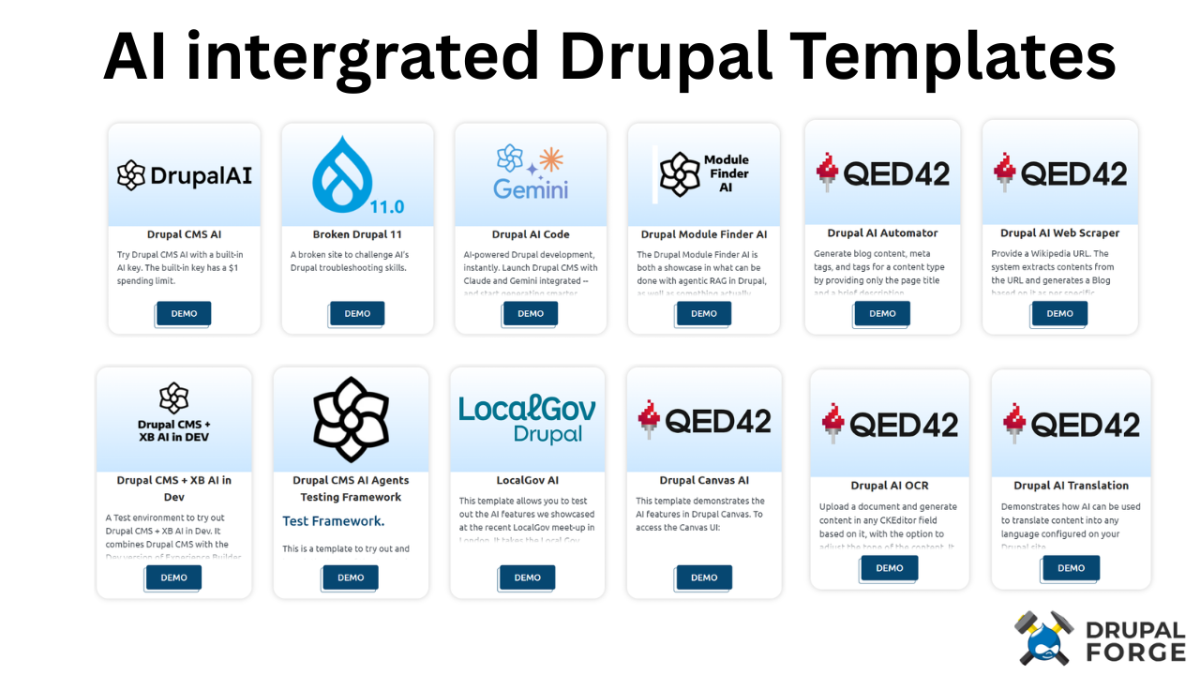
In 2026, AI integration in Drupal is moving fast. DrupalForge has dedicated templates for exploring these features, including Drupal CMS AI (with AI agents that can create content types and vocabularies autonomously) and the Chrome Prompt API demo for in-browser AI. You can explore cutting-edge AI capabilities without touching your local environment.
When to Use Local Development with Docker/DDEV
Local development with DDEV/Docker still wins in several scenarios. We want to be honest here, because the right tool depends on your actual workflow.
Offline or Air-Gapped Work
If you're on a plane, in a cabin, or in a secure environment without internet access, your local DDEV setup keeps running. DrupalForge requires a connection.
Long-Running Production-Level Projects
For a 6-month Drupal build with custom modules, complex theming, and CI/CD pipelines, a local DDEV environment gives you tighter control over your stack. You own the environment completely.
Deep Custom Configuration Needs
If your project requires very specific PHP extensions, custom Nginx configs, Solr integration, or Redis caching, DDEV lets you configure all of that precisely. DrupalForge uses a defined set of pre-configured templates, not a blank-canvas container setup.
Existing Local Workflow Integration
If your team already has a DDEV-based workflow with IDE integrations, Git hooks, and automated testing pipelines, introducing a cloud-based tool mid-project adds switching costs that may not be worth it.
DrupalForge vs. Local Development (Docker/DDEV): Side-by-Side Comparison
| Feature | DrupalForge | DDEV / Docker Local |
|---|---|---|
| Setup time | Under 5 seconds | 15 minutes to several hours |
| Local install required | No | Yes (Docker, DDEV) |
| Offline access | No | Yes |
| Cost | Free (community service) | Free (software), but uses your hardware |
| Composer + Drush | Pre-installed | Manual install/configure |
| PhpMyAdmin / MySQL access | Included by default | Available, requires configuration |
| IDE | Browser-based VS Code | Your local IDE |
| Multi-developer collaboration | Built-in (invite devs directly) | Requires extra tooling (tunnels, etc.) |
| AI Drupal templates | Yes (CMS AI, Chrome Prompt API, etc.) | Manual setup required |
| Infrastructure | Kubernetes on DO/AWS/Azure | Your machine |
| Best for | Demos, learning, testing, contribution | Long-term builds, offline work, custom stacks |
Learn Drupal Faster Using DrupalForge Templates
One of the most underrated use cases for DrupalForge is education. If you're trying to learn Drupal (or get a team up to speed), the traditional path of "install Docker, configure DDEV, get Drupal running, then actually start learning" front-loads all the hard stuff before students see a single Drupal screen.
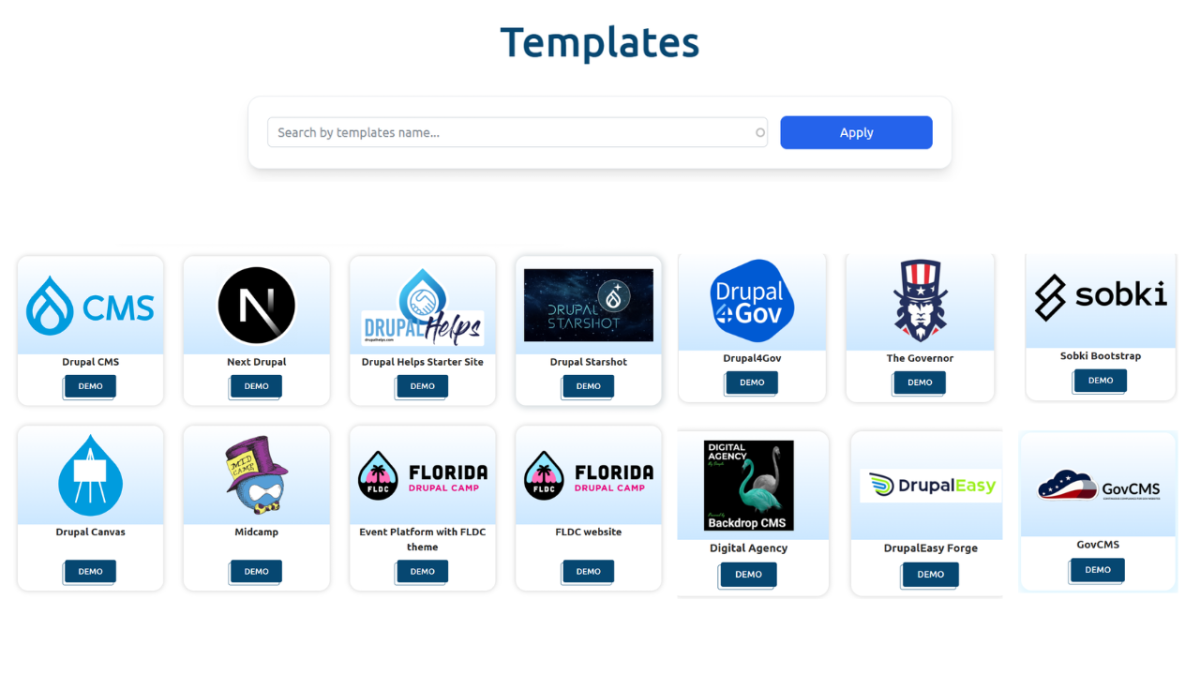
DrupalForge flips this. You start with a running Drupal site and learn from there. Our template library includes options for every level:
Drupal Helps Starter Site (no coding required, pre-installed best practices, perfect for beginners)
Drupal CMS (for site builders without prior Drupal experience)
Drupal 11 (for developers wanting to explore the latest features)
Next Drupal (for learning headless Drupal with Next.js)
FLDC Website (community event platform to learn Drupal Recipes in action)
Each template launches a full, working Drupal environment. When you're ready to go further, you can download the site for local dev or deploy it to production hosting like Digital Ocean or LightSail, connecting your own custom URL while keeping the dev environment alive on DrupalForge.
Exploring AI-Powered Drupal with DrupalForge
In 2026, AI features in Drupal are no longer a novelty. They're a core part of the ecosystem, and DrupalForge is one of the fastest ways to explore them without configuring anything locally.
The Drupal CMS AI template includes:
AI Content Suggestions that work on nodes, blocks, and any entity
CKEditor integration with AI tools for summarization, translation, and rewriting
AI Agents that can autonomously create content types, fields, vocabularies, and workflows
AI-powered automators for automatic field population
Multi-language AI translation features
The Drupal Chrome Prompt API template takes AI even further, letting you explore Gemini Nano running directly in your browser as a local, private AI option. It's a sovereign AI demo (fully private, offline-capable once loaded) that would take significant configuration to replicate in a local DDEV environment.
DrupalForge vs. Local Development (Docker/DDEV): The Windows Reality Check
Here's something the DDEV documentation doesn't always highlight upfront. A large percentage of DDEV users on Windows are actually running it through WSL2 (Windows Subsystem for Linux), not native Windows Docker. This adds another layer of setup complexity that newer developers often don't anticipate.
Did You Know?
Windows accounts for just under a quarter of all DDEV installs, but approximately 85% of those Windows DDEV users are actually running it through WSL2, not native Windows Docker — adding a hidden layer of setup complexity most tutorials skip.
Source: Ironstar Drupal Developer Survey 2024 Results
For someone new to Drupal development on a Windows machine, the path to a working DDEV environment can look like: Install Docker Desktop, enable WSL2, configure Linux distribution, install DDEV inside WSL2, then set up Drupal. That's a non-trivial afternoon.
With DrupalForge, a Windows user opens a browser and gets the same environment as a Linux or Mac user in under 5 seconds. No platform-specific caveats, no WSL2 config guides, no "it works differently on Windows" footnotes.
DrupalForge vs. Local Development (Docker/DDEV): The Community and Contribution Angle
DrupalForge is positioned as a community service, and that framing matters. It's run by OPS Association as a nonprofit, currently free, and designed to lower barriers to Drupal contribution and community participation.
The platform is actually in discussions with the Drupal Association about aligning with Starshot's "Drupal launch button" initiative. That means DrupalForge isn't just a convenience tool. It's part of a broader effort to make Drupal more accessible across the entire ecosystem.
For Drupal community members specifically, DrupalForge provides a fast way to:
Reproduce reported bugs without touching your main dev environment
Test patches from the Drupal issue queue
Share a live Drupal demo with a link (not a "set up your local environment first")
Run live demos at camps and conferences
Compare that to a local DDEV workflow for contribution, where you may need to maintain separate DDEV environments per Drupal version you're testing against, with separate databases, separate configurations, and separate potential for things to break.
Can You Use Both? (Yes, and Here's How)
DrupalForge and local development are not mutually exclusive. In fact, the intended workflow supports both.
A common pattern in 2026 looks like this:
Spin up a DrupalForge environment to prototype or demo an idea quickly
Use the download feature to pull the site to your local machine when you're ready for deeper development
Continue local work in DDEV with a known-good base state
Deploy to production via Digital Ocean, LightSail, or your preferred host
Keep the DrupalForge dev environment paused for quick demos or team review
This hybrid approach gets the best of both worlds. Fast starts and collaboration from DrupalForge, with the deep local control of DDEV when you need it.
Conclusion: DrupalForge vs. Local Development (Docker/DDEV), Decided by Your Workflow
The DrupalForge vs. Local Development (Docker/DDEV): When to Use Which question really comes down to one thing: what are you actually trying to accomplish right now?
If you need a Drupal environment in the next 5 seconds for a demo, to learn Drupal, to test an AI feature, to contribute a patch, or to collaborate with a remote developer, DrupalForge wins. There's nothing faster, nothing simpler, and (for now) nothing free-er.
If you need offline access, full infrastructure control, deeply custom server configurations, or a persistent long-term development environment tightly integrated with your local tools, DDEV/Docker wins. It's a mature, well-supported tool for a reason.
But here's our honest take: most Drupal developers are reaching for DDEV by habit, not necessity. For a large chunk of day-to-day Drupal work in 2026, DrupalForge's zero-configuration cloud approach is simply faster, more collaborative, and more accessible. Try it at DrupalForge.org and see if it changes how you think about your workflow.
Frequently Asked Questions
Is DrupalForge better than DDEV for Drupal development in 2026?
It depends on your use case. DrupalForge is better for demos, learning Drupal, quick testing, and collaborative or cloud-based workflows where zero local setup is a priority. DDEV is better for long-term local builds, offline work, and deeply customized environments. Many developers use both, starting with DrupalForge and downloading to local DDEV when needed.
Does DrupalForge require Docker or any local installation?
No. DrupalForge requires nothing installed locally. You access it entirely through a browser, and the Drupal environments run on Kubernetes-managed containers in the cloud on Digital Ocean, AWS, or Azure. This is the core of its zero-configuration advantage over Docker/DDEV setups.
How long do DrupalForge environments last? Are they really free?
Disposable Drupal sites on DrupalForge last 6 hours and are completely free. Dev environments auto-pause and can be extended in 6-hour increments for as long as you want, with no monthly hour limits on free usage. DrupalForge is operated as a community service by OPS Association, a Colorado nonprofit.
Can I use DrupalForge to demo AI Drupal features without a local setup?
Yes. DrupalForge has several AI-focused Drupal templates ready to launch instantly, including Drupal CMS AI (with AI agents, content suggestions, and CKEditor AI tools) and the Chrome Prompt API demo (with Gemini Nano running locally in the browser). These are among the fastest ways to explore Drupal AI features in 2026 without any local configuration.
What's the difference between DrupalForge and GitPod for Drupal development?
Both DrupalForge and GitPod offer browser-based VS Code environments with pause/resume functionality. DrupalForge differs in that it's Drupal-specific, includes unlimited free dev environments with no monthly active-hour caps, comes pre-loaded with Drupal templates (including AI and government themes), and is run as a nonprofit community service rather than a commercial product.
Can I learn Drupal using DrupalForge if I've never used it before?
Absolutely. DrupalForge includes beginner-friendly templates like the Drupal Helps Starter Site, which requires no coding and comes with predefined content types, best-practice configurations, and learning resources pre-installed. It's one of the most friction-free ways to learn Drupal in 2026 because you get a working site before you have to set up anything.
Can I use DrupalForge for production hosting or just development?
DrupalForge environments are intended for development, demos, testing, and learning, not direct production hosting. However, you can deploy your site to production (Digital Ocean, LightSail, etc.) from DrupalForge and connect a custom domain, while keeping your DrupalForge dev environment running in parallel for ongoing development work.