DrupalForge vs Tugboat for Drupal Demos and Testing
Drupal teams have more cloud-based tools than ever before. That is a good thing.
For years, Drupal developers had to rely on local environments, shared staging servers, manual demo sites, or custom infrastructure just to show work in progress. Today, tools like Tugboat and DrupalForge make it much easier to spin up real Drupal environments in the cloud.
But Tugboat and DrupalForge are not the same kind of tool.
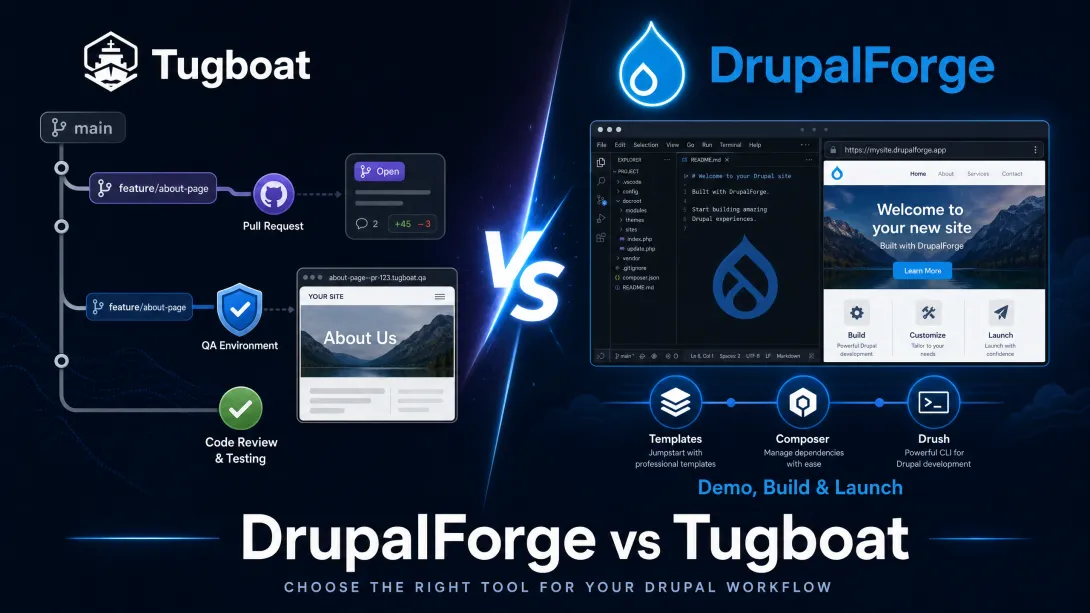
Tugboat is best known for automated preview environments, especially for pull requests, merge requests, testing, stakeholder review, visual regression, and quality assurance workflows.
DrupalForge is focused on instant Drupal demos, cloud development environments, site templates, browser-based VS Code, Composer, Drush, phpMyAdmin, collaboration, and helping users move from demo to development faster.
Both tools are valuable. The important question is not simply, “Which one is better?”
The better question is: What kind of Drupal workflow are you trying to improve?
Two Different Problems
Tugboat and DrupalForge solve overlapping but different problems.
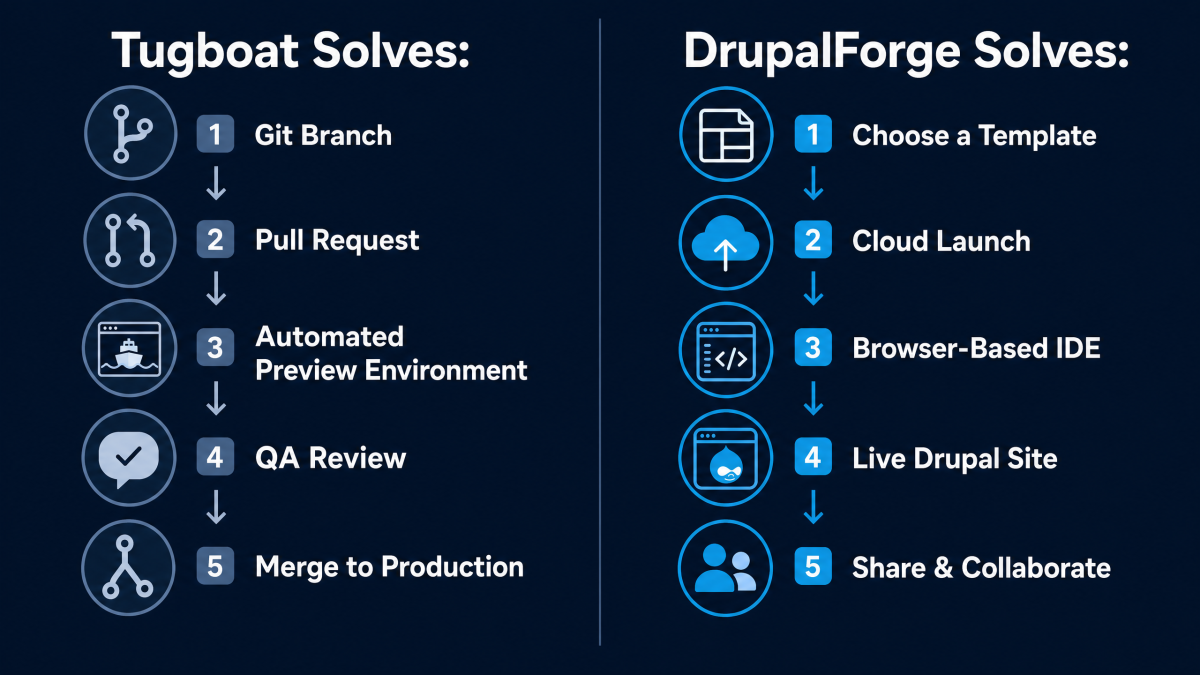
Tugboat is built around previewing work tied to code changes. A developer opens a pull request or merge request, and Tugboat can build a working preview of that branch so developers, QA teams, and stakeholders can test it before the code reaches production.
That is extremely useful for professional engineering workflows.
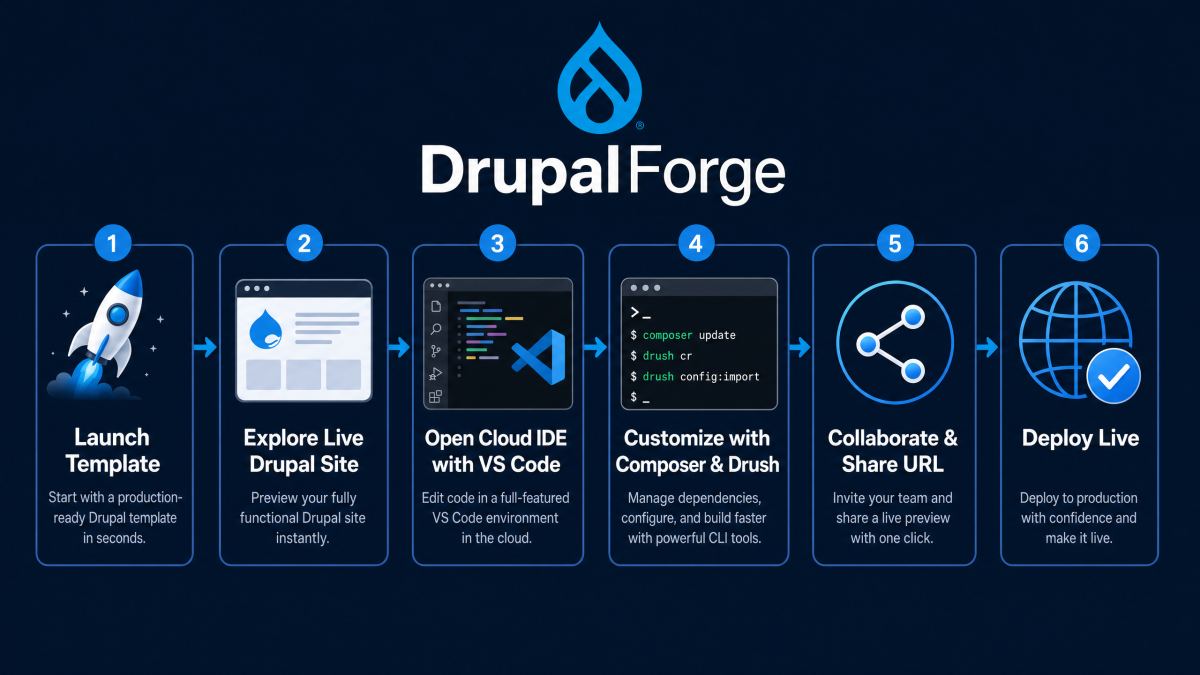
DrupalForge starts earlier in the journey. It is designed to make Drupal easier to try, demo, learn, build, customize, and share. A user can launch a Drupal template or demo in the cloud, access the site, open a browser-based VS Code environment, use Composer and Drush, inspect the database, collaborate with others, and move toward deployment if the project becomes real.
That is extremely useful for Drupal adoption, training, demos, agencies, contributors, and early-stage development.
In simple terms:
Tugboat is strongest when the work starts from code.
DrupalForge is strongest when the work starts from a live Drupal experience.
What Tugboat Does Well
Tugboat has earned a strong reputation in the Drupal community because it solves a real development problem: how do you preview and test code changes before they go live?
For Drupal core and contributed projects, Tugboat is used to create live preview environments for merge requests. When a merge request is opened, a preview can be generated from the target branch with the proposed changes applied. That gives reviewers a working site they can test instead of asking everyone to reproduce the issue locally.
This is a major improvement for contribution workflows.
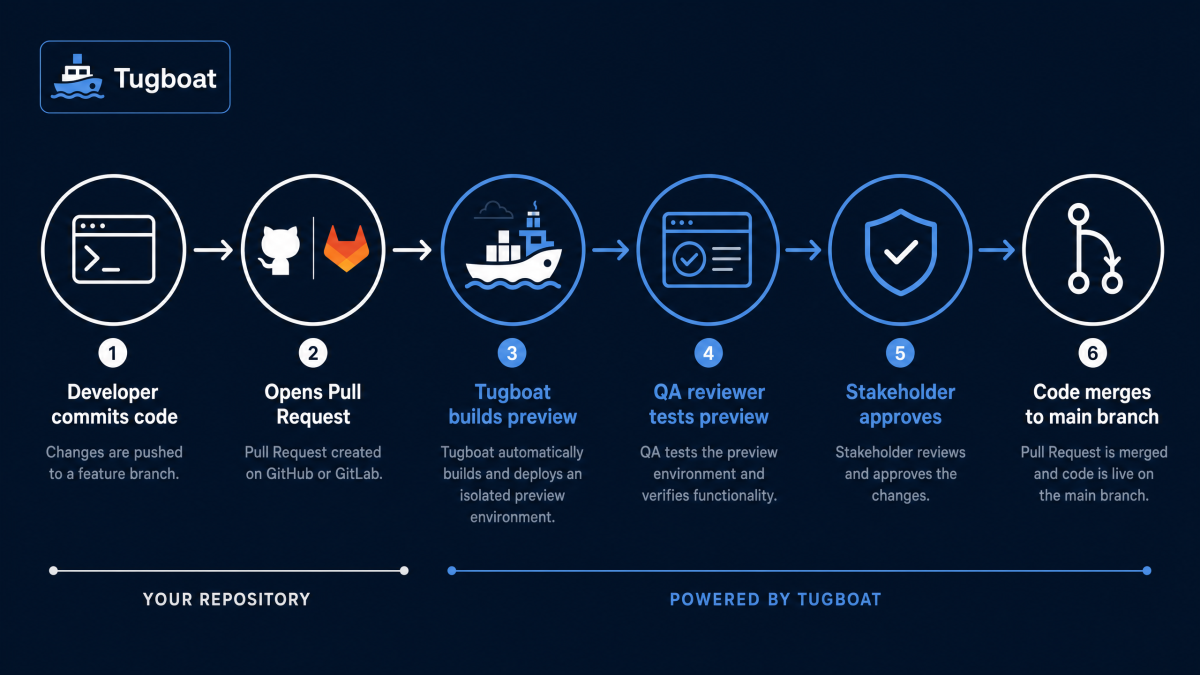
Tugboat is also useful for agency and enterprise teams that need preview environments for Git branches, pull requests, or feature work. Instead of deploying everything manually to a shared staging server, each change can get its own isolated environment.
That helps teams:
Review pull requests more easily
Test code before it reaches production
Share work with stakeholders
Run visual regression testing
Run accessibility and SEO audits on higher plans
Capture outbound email during previews
Use shell access, CLI tools, and APIs
For teams that already have a mature Git workflow, Tugboat fits naturally into the development pipeline.
What DrupalForge Does Well
DrupalForge solves a different problem: how do you make Drupal instantly usable?
Many people who want to try Drupal are not ready to configure a local development environment. They may be site builders, content editors, students, agency prospects, nonprofit teams, university staff, marketers, evaluators, or developers who simply want to test something quickly.
DrupalForge removes the first barrier.
Instead of installing Docker, configuring PHP, installing Composer, setting up Drush, creating a database, and troubleshooting a local stack, users can launch a Drupal environment in the cloud and start working from the browser.
DrupalForge provides:
Instant Drupal demos
Template-based Drupal experiences
Cloud-based development environments
Browser-based VS Code
Composer and Drush pre-installed
phpMyAdmin for database access
Live Drupal site URLs for sharing
Pause, unpause, and timeout extension workflows
Collaboration between developers
A path from demo to development and deployment
This makes DrupalForge especially strong for demos, training, experimentation, evaluation, and early project development.
The Main Difference: Testing vs Adoption
The most important difference between Tugboat and DrupalForge is the primary use case.
| Category | Tugboat | DrupalForge |
|---|---|---|
| Primary purpose | Preview and test code changes | Launch, demo, develop, and share Drupal sites |
| Starting point | Git branch, pull request, or merge request | Template, demo, Drupal site, or cloud dev environment |
| Best audience | Developers, QA teams, maintainers, DevOps teams | Developers, site builders, agencies, trainers, contributors, evaluators |
| Best workflow | Review and test code before production | Try Drupal, build in the browser, collaborate, and move toward deployment |
| Strongest advantage | Automated preview environments tied to Git workflows | Instant hands-on Drupal environments with built-in development tools |
Tugboat helps teams test work in progress.
DrupalForge helps people experience Drupal faster.
Both are important, but they serve different moments in the Drupal lifecycle.
Drupal Demos Are Not the Same as Testing Previews
This distinction matters because the word “demo” can mean different things.
For a developer, a demo might mean a preview of a branch so another developer can review a pull request.
For an agency, a demo might mean showing a live Drupal site to a client.
For a marketer, a demo might mean testing Drupal CMS, Drupal Canvas, or AI-assisted content editing.
For a trainer, a demo might mean giving every student the same working Drupal environment.
For a contributor, a demo might mean quickly testing a module, issue, or feature.
Tugboat is very strong for the first scenario: code review and testing previews.
DrupalForge is stronger for the broader demo experience: letting more people launch, explore, edit, and understand Drupal without local setup.
This is where DrupalForge has a strategic advantage for Drupal adoption. It does not assume the user already has a Git workflow. It does not assume the user is already working from a pull request. It lets the user start with Drupal itself.
When Tugboat Is the Better Choice
Tugboat is the better choice when your main goal is to test code changes before they are merged or deployed.
Use Tugboat when you need:
Pull request previews
Merge request previews
Preview environments connected to GitHub, GitLab, or Bitbucket
Automated rebuilds when code changes
QA review environments for branches
Visual regression testing
Email capture during test workflows
Accessibility and SEO audits on larger plans
A preview workflow for Drupal core or contrib issues
If your team already has a strong Git-based development process and needs a preview environment for every code change, Tugboat is built for that.
It is a serious tool for engineering teams.
When DrupalForge Is the Better Choice
DrupalForge is the better choice when your main goal is to make Drupal easy to try, demo, learn, customize, and share.
Use DrupalForge when you need:
Instant Drupal demo sites
Template-based Drupal experiences
A browser-based Drupal development environment
VS Code in the browser
Composer and Drush without local installation
phpMyAdmin without local database setup
Live URLs for client or stakeholder demos
Cloud-based environments for workshops or training
Collaboration between developers in the same environment
A path from demo to development and deployment
If your goal is to show Drupal’s value quickly, DrupalForge is the better fit.
It helps people get to the “aha moment” faster.
Why Agencies Should Care
Agencies need both testing and sales momentum.
Tugboat can help agency developers and QA teams review code changes before production. That is valuable inside the delivery process.
DrupalForge can help agencies win projects before delivery even begins. It gives agencies a way to show live Drupal templates, prototypes, AI demos, Canvas demos, and cloud development workflows without building everything from scratch.
This matters because clients do not buy what they cannot understand.
A working DrupalForge demo can make Drupal tangible. Clients can click through the site, test the admin interface, review content editing, see the template, and understand the workflow. That is much stronger than a slide deck or static screenshot.
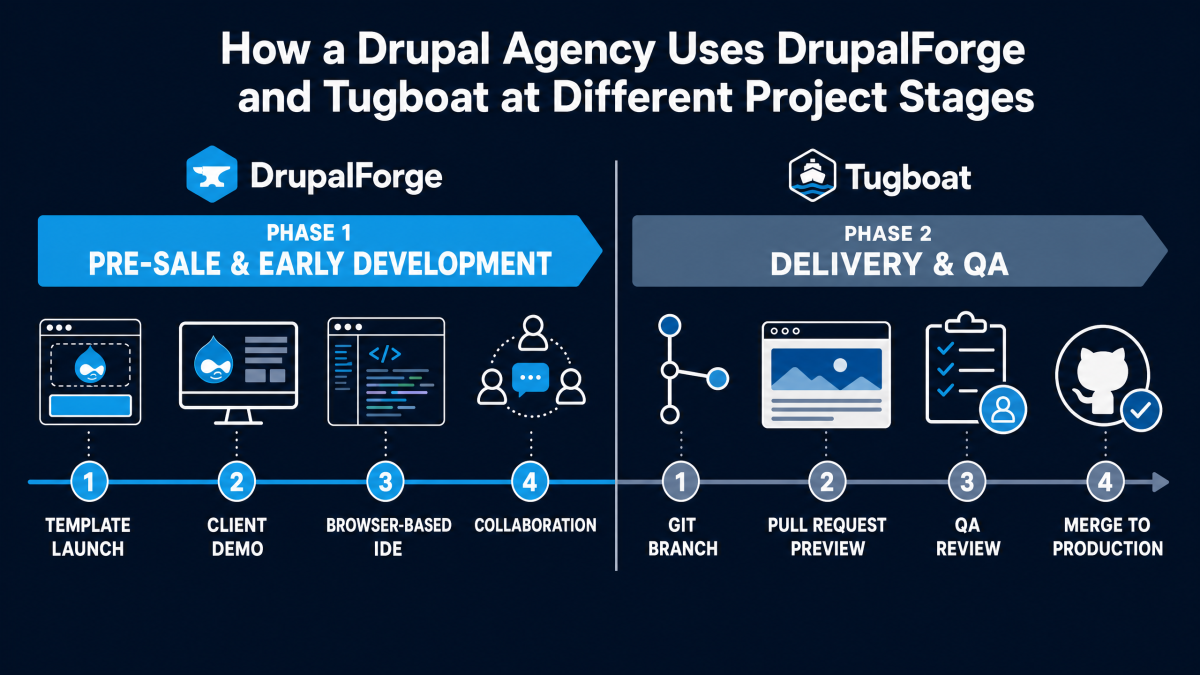
For agencies, the real opportunity is to use the right tool at the right stage:
Use DrupalForge to sell, demo, prototype, train, and begin development.
Use Tugboat to test code changes and review pull requests inside mature delivery pipelines.
That is a smart combination.
Why DrupalForge Is Stronger for First-Time Drupal Users
Drupal adoption often fails at the first step.
Someone hears about Drupal CMS, Drupal AI, Drupal Canvas, or a new template. They want to try it. But before they can experience the value, they are asked to set up a local environment, install tools, configure dependencies, or understand a Git workflow.
That is too much friction.
DrupalForge removes that barrier.
A first-time user can launch a Drupal environment in the cloud, log in, explore the admin interface, edit content, open the Cloud IDE, and share the site. They do not need to become a DevOps engineer before they can understand Drupal.
This is where DrupalForge has a different mission from Tugboat.
Tugboat helps Drupal teams test changes.
DrupalForge helps more people discover Drupal.
Why DrupalForge Is Stronger for Training
Training is one of the clearest DrupalForge use cases.
In a Drupal workshop, the first hour can easily disappear into setup problems. One student has Docker issues. Another has an old PHP version. Another cannot import the database. Another has permissions problems. Another is on a locked-down company laptop.
DrupalForge changes the training model.
Everyone can start from the same cloud-based Drupal environment. Everyone can open the same browser-based IDE. Everyone has the same tools. Everyone can use the same template.
That helps instructors focus on Drupal instead of troubleshooting local machines.
Tugboat can be useful for testing and review, but DrupalForge is more natural for hands-on teaching, onboarding, and guided learning.
Why DrupalForge Is Stronger for Site Builders and Content Editors
Tugboat is primarily developer-oriented. It assumes a workflow connected to code changes, repositories, branches, and previews.
DrupalForge is more approachable for site builders and content editors because it starts from a working Drupal site.
A site builder can launch a template and explore how it is configured. A content editor can try an AI-assisted editing workflow. A marketer can review a landing page demo. A nonprofit team can test a ready-made site structure. A university team can evaluate a Drupal CMS template.
They do not need to understand pull requests before they can participate.
That makes DrupalForge more inclusive for non-developer stakeholders.
Browser-Based VS Code Is a Major Difference
DrupalForge’s Cloud Dev Environment includes a browser-based VS Code experience. That gives developers a familiar editing workflow without requiring a local setup.
This is important because Drupal development is not only about previewing a finished branch. Developers often need to edit files, run Composer, run Drush, inspect the database, rebuild caches, test changes, and collaborate with others.
DrupalForge brings those tools into the same cloud environment.
That means a developer can:
Open the Drupal codebase in the browser
Edit modules, themes, templates, and configuration
Run Composer commands
Run Drush commands
Use phpMyAdmin for database inspection
Preview the live Drupal site
Share the URL with another person
This makes DrupalForge more than a demo launcher. It is a hands-on development environment.
Tugboat Is Stronger for Automated QA
DrupalForge is strong for demos and cloud development, but Tugboat has a clear edge for automated QA workflows.
Tugboat’s preview model is designed around branches, pull requests, rebuilds, visual regression, and review before production. For engineering teams that need consistent automated preview environments tied to Git activity, Tugboat is a mature solution.
That is not a weakness for DrupalForge. It is a difference in purpose.
DrupalForge is not trying to be only a QA preview tool. It is trying to make Drupal easier to experience, customize, develop, and launch.
The wise move is not to pretend both tools are identical. They are not.
DrupalForge Is Stronger for Template Marketplaces
The future of Drupal is not just one-off site builds. It is also templates, recipes, AI demos, Canvas demos, reusable site patterns, and faster ways to evaluate Drupal solutions.
This is where DrupalForge becomes strategically important.
A template marketplace needs more than code previews. It needs live, editable, shareable demo environments. A user should be able to launch a template, experience the site, open the admin interface, test the editing workflow, customize the site, and decide whether the template is useful.
DrupalForge is built for that kind of experience.
This is especially important for agencies and template creators. A reusable Drupal template becomes much more valuable when people can instantly try it.
That is the difference between “Here is a repository” and “Here is a working Drupal site you can use right now.”
Testing Is Not the Same as Evaluation
Tugboat is excellent when the question is:
Does this code change work?
DrupalForge is stronger when the question is:
Is this Drupal solution useful for me?
Those are different questions.
Testing is about confidence before code is merged.
Evaluation is about understanding whether a platform, template, workflow, or demo solves a real problem.
Drupal needs both.
How the Tools Can Work Together
The best strategy is not always either-or.
A mature Drupal organization could use both tools:
DrupalForge for demos, training, template exploration, early development, and client-facing prototypes.
Tugboat for pull request previews, branch testing, QA review, and automated testing workflows.
This gives teams the best of both worlds.
DrupalForge helps more people get into Drupal.
Tugboat helps teams verify changes before production.
That is a healthy division of labor.
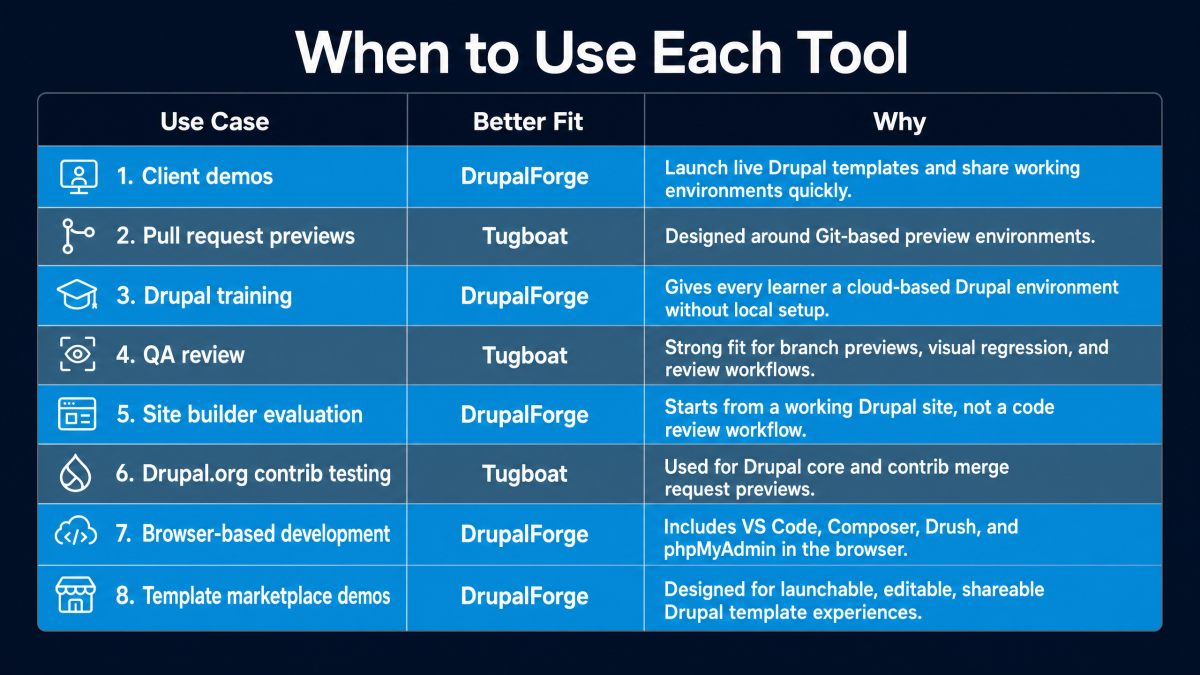
Comparison Summary
Final Verdict
Tugboat is an excellent tool for Drupal testing and preview workflows. If your team needs automated environments for pull requests, merge requests, branch testing, visual regression, or QA review, Tugboat deserves serious consideration.
DrupalForge is the stronger choice when the goal is Drupal adoption, demos, training, template exploration, browser-based development, collaboration, and moving from a live demo into real development.
The difference is simple:
Tugboat helps teams test code changes.
DrupalForge helps people experience, build, and launch Drupal faster.
For Drupal’s future, both matter. But for agencies, site builders, trainers, contributors, and organizations trying to make Drupal easier to try, DrupalForge offers a more complete path from first click to working Drupal environment.
That is why DrupalForge is not just a testing preview tool.
It is a Drupal adoption platform.
Try DrupalForge today and launch a live Drupal demo, open VS Code in the browser, use Composer and Drush, collaborate with your team, and move from demo to development in the cloud.